HTML links

HTML links

HTML links are made with the <a> tag and the href attribute. So you would make a link by doing something like <a href=”somehyperlink”> something something</a>.  The text outside of the tags is what you can see of the hyperlink. You can change the default color of the link using CSS. You can also change here the link will be opened by using the target attribute You can make images into a link, and there are bookmark links that allow you to go to a specific part of the web page. Often you will put the links into navigation menues and things.

For more specific information I would suggest going to the link below which is where I found most of this information:
https://www.w3schools.com/html/html_links.asp
HTML stylization

HTML stylization

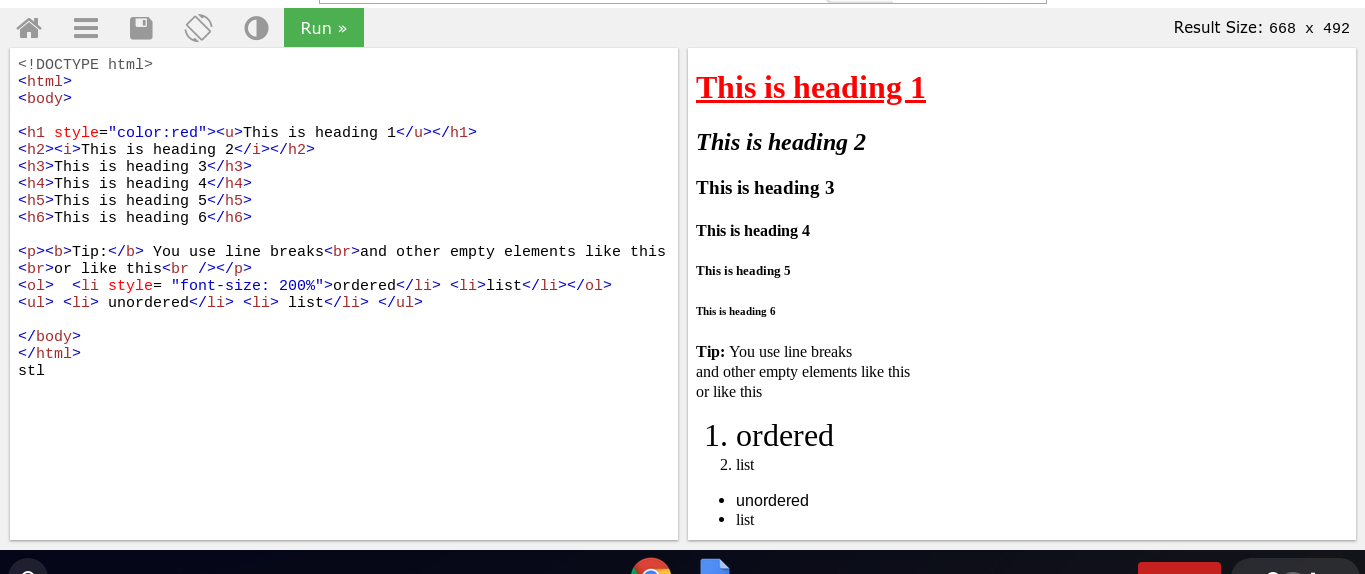
A lot of the stylization of a website in HTML come from another language like CSS, but there are some things you can do with HTML to stylize your website. The first thing you can do is editation of font sizes either by using diffrent heading sizes(<h1>,<h2>,<h3>, etc).

You can also do things like bold<b>, italize<i>, and underline<u>

Make lists Ordered<ol> and Unordered<ul> which need the <li> tag inside for each list iteam.

Add a image<img scr = “url” alt = ” description of picture in case it doesnt show up”> or a link to a external link<a href=”url“> text that link is attached to </a>.

You can also add things like line breaks<br>(which doesn’t need to use a ending tag since it is empty)

Or changing the color,kind, size,ect of font, by putting style=”color:red””font-family: …” “backround-color : . . .” “font-size: ..%”.

Along with things like tables, which I will get into how to make on a later

Below is an example with some of the stylistic elements.

Tags

Tags

Tags are the words between “<” and “>” and they generally have ending and begging tags. A begin tag is just <tag> while a closing tag is </tag> . You use these tags by putting a begging tag the words/sentence/ect to be affected by that tag and then a closing tag.

For example:

<p> Hello World</p>

will show

Hello World

The p being the tag for a paragraph.